Getting Started
How to install and use the compiler.
Welcome! Let's start by installing os-compiler, which will be referenced later as just compiler.
Compiler is required for you to easily compile your OS and apps source code, add bootloader, kernel, all the needed libraries, and make the final binaries.
Start by downloading latest OS compiler release from GitHub either manually or via terminal:
git clone --branch v0.0.2 https://github.com/CatCoreV/os-compiler.gitAfter that, enter os-compiler folder and run install script depending on your host OS either by double clicking or terminal:
.\install-windowsNow, just open catcore_compiler.exe to open compiler GUI:
./install-unix.shNow, just open catcore_compiler to open compiler GUI:
./install-unix.shNow, just open Catcore Compiler to open compiler GUI:
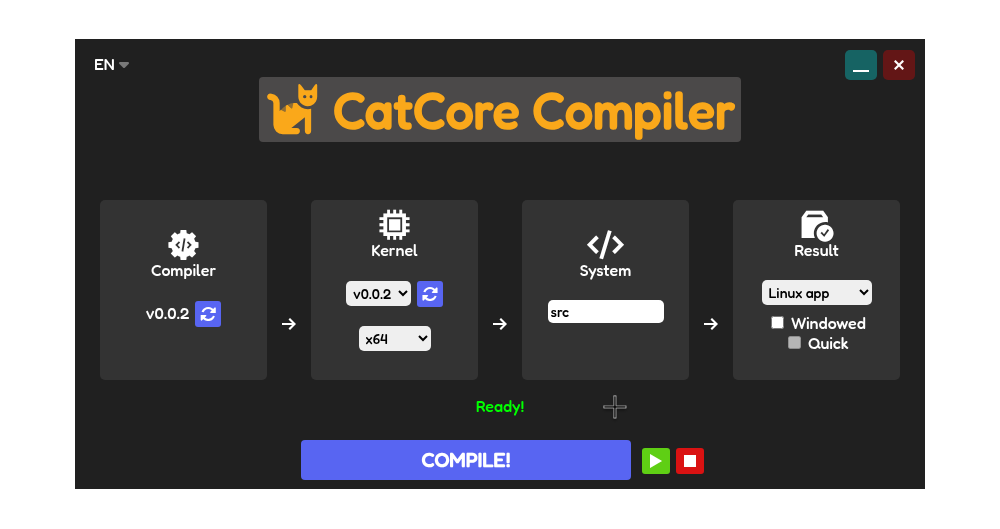
First I would recommend to learn about all compiler sections and buttons:
Now, that you have understanding of the compiler, you can continue this guide to make and boot your first OS.